
How to Use Visit Japan Web | One QR Code for Japan's Immigration and Customs: Registration Steps and What Happens at the Airport
How to use the Digital Agency's Visit Japan Web to register your immigration Disembarkation Card for Foreigner and your customs Declaration of Accompanied Articles and Unaccompanied Articles before you arrive, and then show a QR code at the airport, based on official information from the Digital Agency, the Immigration Services Agency of Japan and Japan Customs. Also covers submitting on paper, registering family members, who cannot use it, and the current status of JESTA (electronic travel authorization).
Ad · Affiliate This article contains links to partner booking and shopping pages (affiliate links). If you book or buy through these links, the site operator may receive a commission from the partner. Our advertising policy
Overview
Visit Japan Web is a web service provided by Japan's Digital Agency. Before you arrive, you can use your smartphone to register the information for the two documents you submit when entering Japan: the Disembarkation Card for Foreigner for immigration and the Declaration of Accompanied Articles and Unaccompanied Articles for customs. Once you register, a single QR code is displayed, which you use at both immigration and customs (according to the Digital Agency).
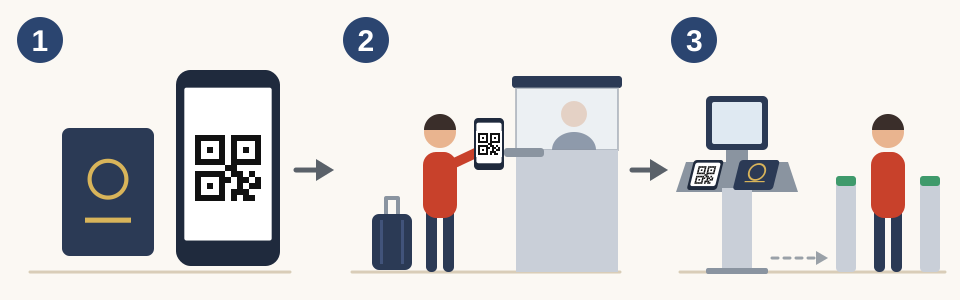
- Before entering Japan, register your information using your smartphone and passport so that you can display the QR code.
- At airport immigration, show the QR code to the immigration officer.
- At customs, have the electronic declaration terminal scan your QR code and passport, then go through the electronic declaration gate.
Using Visit Japan Web is optional. The Immigration Services Agency of Japan and Japan Customs recommend submitting electronically through Visit Japan Web, but you can also use the paper Disembarkation Card for Foreigner and the paper declaration form. However, you still need to submit the documents. Foreign nationals making a new entry into Japan, not a re-entry, submit the Disembarkation Card for Foreigner, and everyone entering Japan submits the Declaration of Accompanied Articles and Unaccompanied Articles (according to the Immigration Services Agency of Japan and Japan Customs).
Setup
How to register
To register, you need your passport, details of the flight you will take, the address of where you will stay in Japan, and an email address. You can choose the screen language from 9 languages (Japanese, English, Simplified Chinese, Traditional Chinese, Korean, Vietnamese, Thai, German and French). This article uses the button names on the English screen.
- Open Visit Japan Web (vjw.digital.go.jp) in your smartphone's browser and create an account with "Create an account". Enter the verification code sent to your email, and your account is created.
- Register your own information in "Your Details". You can scan your passport with the camera or enter the details yourself. If your passport has less than 6 months of validity left, a warning is displayed.
- If you are entering Japan with family members, register them in "Details of family members traveling with you". You can register up to 10 accompanying family members, and they can complete the procedures without creating their own accounts.
- In "Register new planned entry/return", register your planned arrival date in Japan, your airline, your flight number, and where you will stay in Japan (the hotel's name, address and phone number). Enter this information in Latin letters and numbers.
- Open the plan you registered, go to "Immigration clearance and Customs declaration", answer the questions for the Disembarkation Card for Foreigner and the customs declaration, and press "Register".
- Press "Display QR Code", read the notes, and then press "Agree and display the QR code" to display the QR code.
The Immigration Services Agency of Japan asks travelers to finish entering their information before they reach the immigration area. Creating an account and registering your plan require an internet connection, so getting this done before you leave means you will not have to rush after you arrive.
Step by step
What happens at the airport
- Immigration: At the immigration counter, show your QR code to the immigration officer. After showing the QR code, you are examined by the immigration officer.
- Customs: Have the electronic declaration terminal in the customs inspection area scan your QR code and passport. The terminal takes a photo of your face to confirm your identity and, depending on what you declared, directs you either to the electronic declaration gate or to an inspection counter staffed by officers.
- Electronic declaration gate: Facial recognition lets you walk through without stopping. Electronic declaration gates are available at 7 airports: New Chitose, Narita, Haneda, Chubu, Kansai, Fukuoka and Naha (according to Japan Customs).
Each family member also displays their own QR code and goes through the procedures one person at a time. To use the electronic declaration gate, you need a passport with an IC chip. Children under 100 cm tall may be able to go through the gate together with their family (according to Japan Customs).
Some terminals at Kansai International Airport, Haneda Airport, Narita Airport and Fukuoka Airport have "joint kiosks" for immigration and customs. When a joint kiosk scans your QR code and passport, the information needed for immigration and customs is provided in one go. Foreign nationals who use a joint kiosk go through immigration at booths dedicated to kiosk users (according to the Immigration Services Agency of Japan).
Conditions
Check before you use it
- People re-entering Japan: Foreign nationals entering Japan with a re-entry permit (including a special re-entry permit) are not making a new entry, so they are not eligible to submit the Disembarkation Card for Foreigner through Visit Japan Web (according to the Immigration Services Agency of Japan). The only procedure they can complete on Visit Japan Web is the customs declaration (according to the Digital Agency).
- Devices: You can register on a computer, but at the airport you show the QR code on a smartphone or tablet. The recommended browsers are Safari and Google Chrome on iOS devices such as the iPhone, and Google Chrome on Android (Digital Agency FAQ).
- Without internet: If you log in beforehand and stay logged in, you can display the QR code for immigration and customs even without an internet connection (Digital Agency FAQ).
- Visas: For whether you need a visa, the Visit Japan Web FAQ refers you to the website of the Ministry of Foreign Affairs of Japan.
- Paper forms: If, for example, you are not comfortable using a smartphone, submit the paper Disembarkation Card for Foreigner (according to the Immigration Services Agency of Japan). Paper Declaration of Accompanied Articles and Unaccompanied Articles forms are available on the plane and at customs (according to Japan Customs).
Good to know
JESTA (electronic travel authorization) has not started yet
JESTA (Japan's electronic travel authorization system) is a system requiring foreign nationals and others making short-term stays without a visa, such as for sightseeing, to obtain authorization online before entering Japan. The law creating JESTA was enacted in May 2026, but its start date is set as "a date to be specified by Cabinet Order by March 31, 2029" and has not been decided yet (according to the Immigration Services Agency of Japan, as of October 3, 2026). Check the Immigration Services Agency of Japan's information for when it will start and how to apply.
The tax-free QR code
Foreign nationals can also display a QR code on Visit Japan Web for tax-free shopping. However, this QR code does not replace your passport and cannot be used at stores that do not support it. Screenshots cannot be used either (according to the Digital Agency). The tax-free procedure is covered in Tax-Free Shopping in Japan | The Refund Method from November 2026 and What to Do When You Leave Japan.
Internet in Japan
Creating a Visit Japan Web account and registering your plan require an internet connection. How to get online in Japan is covered in Getting Online in Japan | eSIM vs SIM Card vs Pocket Wi-Fi, What to Check First, and Airport Pickup.