Getting Online in Japan | eSIM vs SIM Card vs Pocket Wi-Fi, What to Check First, and Airport Pickup
There are five main ways to get your smartphone online in Japan: eSIM, SIM card, pocket Wi-Fi, international roaming and free Wi-Fi. This guide explains how they differ, what to check before using an eSIM or SIM card, the order for setting up an eSIM, picking up and returning pocket Wi-Fi at the airport, and what to know about devices brought from overseas, based on official information from Japan's Ministry of Internal Affairs and Communications, the airports and device makers.
Overview
There are five main ways to get your smartphone online in Japan. Which one suits you depends on your device, how many people you are traveling with and where you are going.
- eSIM: You add a data plan that works in Japan to the SIM built into your smartphone. There is no card to swap, and you can set it up before you leave.
- SIM card: You insert a prepaid SIM card that works in Japan into your smartphone. You can buy one at airport counters and vending machines, or at large electronics stores.
- Pocket Wi-Fi: You rent a small, portable Wi-Fi router. You pick it up at the airport or have it delivered to your hotel.
- International roaming: You keep using your home mobile carrier's network in Japan. Check prices and plans with your carrier.
- Free Wi-Fi: Available at airports and hotels, as well as some stations and shops.
JNTO (Japan National Tourism Organization) says that large cities have many free Wi-Fi spots, but if you want a reliable connection everywhere, including rural areas, it recommends renting a pocket Wi-Fi.
Comparison
How the options compare
| Option | Devices it works with | Pickup and return | Use with other devices |
|---|---|---|---|
| eSIM | A smartphone that supports eSIM and is not SIM-locked | Nothing to pick up or return. Set up with a QR code or an app | Whether tethering is allowed depends on the plan |
| SIM card | A smartphone that takes a SIM card and is not SIM-locked | Buy at the airport or a store. Nothing to return | Whether tethering is allowed depends on the plan |
| Pocket Wi-Fi | Any device that connects to Wi-Fi (smartphone, tablet, laptop, etc.) | Pick up at the airport or hotel, and return it when you are done | Several devices can connect to one router |
| International roaming | The smartphone you already use | None | Depends on the plan |
- SIM locks are explained in “What to check before using an eSIM or SIM card.”
- Data-only plans do not come with a Japanese phone number. To make calls, you will need a calling app that works over the internet. Some plans for travelers do include a phone number.
- If you move too far from the pocket Wi-Fi router, your smartphone and other devices lose their connection. If your group splits up, anyone who does not have the router cannot connect.
- Pocket Wi-Fi stops working when the router's battery runs out. You need to charge the router as well as your smartphone.
- Rental and eSIM prices, data allowances, the number of days of use, and what happens if you lose the router vary by company and plan. Check the company's information before you sign up.
- Emergency numbers for the police, ambulance and more are listed in Emergency Numbers in Japan | Police 110, Ambulance 119, and Help in English.
Compatibility
What to check before using an eSIM or SIM card
If you bought your smartphone from a mobile carrier in your home country, it may be set up so that it cannot use other carriers' SIMs. This is called a SIM lock. If your phone is still SIM-locked, you cannot use a Japanese eSIM or SIM card. JNTO also notes that your smartphone must be SIM-unlocked to use a SIM card.
- iPhones that support eSIM are two models, the iPhone XS and iPhone XR, plus all models newer than these two. To check whether your iPhone is SIM-locked, open the Settings app and go to General → About. If “No SIM restrictions” appears next to Carrier Lock, you can use eSIMs from other carriers (per Apple).
- On Android smartphones, whether you can use an eSIM depends on the model and on the country and carrier you bought it from. For example, all Google Pixel models from Pixel 4 onward support eSIM, but Pixel 3a and Pixel 3 cannot use eSIM if they were bought in certain countries or from certain carriers (per Google). Check with your phone's manufacturer or your mobile carrier.
- Only your mobile carrier can remove the SIM lock on an iPhone. Unlocking can take a few days (per Apple). If your phone is SIM-locked, ask your carrier to unlock it before you leave.
Setup
Steps to set up an eSIM
If you set up your eSIM before you arrive in Japan, you can use it as soon as you land.
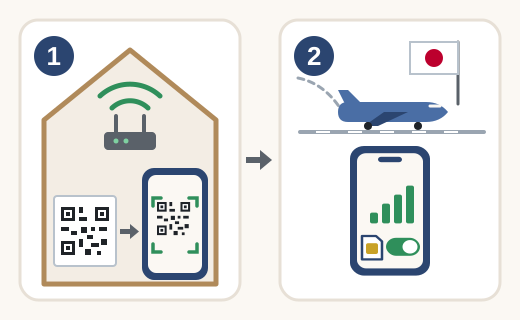
- Before you leave, while connected to Wi-Fi at home or elsewhere, install the eSIM you bought on your smartphone using the QR code or app.
- After you arrive in Japan, turn on the Japanese eSIM line and select it as the line for mobile data.
- To set up an eSIM on an iPhone, you need an internet connection, such as Wi-Fi (per Apple). If you could not set it up before leaving, you can connect to the free Wi-Fi at the airport in Japan and set it up there.
- On supported models, you can keep both your home line and the Japanese eSIM installed. However, if you leave your home line turned on, you may be charged roaming fees on that line (per Apple). Set your phone to use only the Japanese eSIM for mobile data, and turn off your home line when you are not using it.
Picking up and returning pocket Wi-Fi at the airport
- Narita Airport, Haneda Airport and Kansai International Airport all have counters that rent out pocket Wi-Fi, as well as counters and vending machines that sell SIM cards. You can check which companies are in which terminal on each airport's website.
- Airport counters have set opening hours. If you arrive late at night or early in the morning, check with the company you booked with when you can pick it up. Haneda Airport and Kansai International Airport also have unstaffed pickup machines that can be used 24 hours a day (per the airports).
- Instead of picking it up at the airport, you can also have it delivered to your hotel (per JNTO).
- How to return it varies by company. If you return it at the airport, note that at Narita Airport all rental counters are in the area before departure immigration (per the airport). Return it before you go through departure immigration.
Good to know
Devices brought from overseas, and using free Wi-Fi
In Japan, devices that use radio waves need the technical conformity mark (known as the “Giteki” mark), which shows they meet Japan's technical standards. Devices brought in by travelers have the following exceptions (per the Ministry of Internal Affairs and Communications).
- A smartphone with a contract from overseas can be used without the technical conformity mark if it meets certain conditions, whether you use it with international roaming or with a Japanese SIM card inserted.
- The Wi-Fi function of a smartphone or tablet can be used without the technical conformity mark within 90 days from the day you enter Japan, as long as it meets international standards.
- Smartphone tethering can also be used during the same period, but there are conditions on which frequencies can be used. Before you leave, check with the manufacturer or your mobile carrier which frequencies your phone uses.
- Narita Airport, Haneda Airport and Kansai International Airport all offer free Wi-Fi. To connect, select the airport's network and agree to the terms of use shown on screen.
- Kansai International Airport states that its free Wi-Fi traffic is not encrypted. Narita Airport recommends using a VPN if you need a secure connection. Avoid entering passwords or card numbers over unencrypted Wi-Fi.
- According to JNTO, many large hotels in cities have Wi-Fi, but smaller places to stay, such as ryokan (Japanese inns) and minshuku (family-run guesthouses), may not. Check when you book.