How to Use Coin Lockers at Train Stations in Japan | Typical Prices, Payment and the 3-Day Limit
Multi-Ecube coin lockers, found at many JR East stations, are paid for in advance with a transit IC card or another method and can be used for up to 3 days, counting the day you store your bags. This guide explains typical prices, how to store and collect your bags, and how to reserve a locker, based on official information.
Overview
Many stations in Japan have coin lockers where you can leave your bags. They are handy when you want to drop off your luggage and sightsee hands-free, for example between checking out of your hotel and catching your train or flight home. This guide uses Multi-Ecube, a type of locker found at many JR East stations, as an example. The lockers are operated by JR East Smart Logistics, a JR East group company.
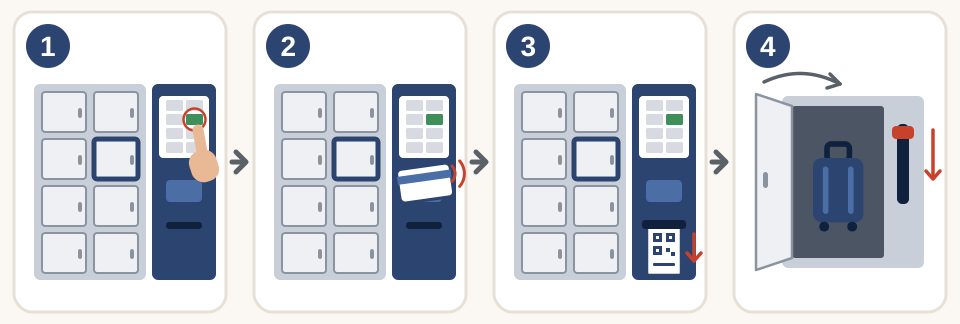
- On the control panel screen, choose a free locker (shown in green).
- Pay in advance, for example with a transit IC card.
- Take the retrieval ticket that comes out.
- Put your bags in, close the door, and push down the lever beside the door to lock it.
Conditions
Payment
- You pay in advance. You pay for the first day before putting your bags in. If your bags stay in the locker past 2:00 a.m., you pay for the extra time when you collect them (see “How long you can use a locker” below).
- Multi-Ecube lockers do not accept cash. Despite the name “coin locker”, they do not take coins. Pay with a transit IC card (such as Suica), QR code payment, a credit card or similar. Accepted payment methods vary by machine, so check the signs next to the payment unit.
- Stations also have other types of lockers. Prices, payment methods and how many days you can use a locker depend on the type of locker, so check the information on the locker.
How long you can use a locker
- You are charged per day, and the day changes at 2:00 a.m. Even if you store your bags for only a short time, you pay for 2 days if 2:00 a.m. passes while they are in the locker.
- You can use a locker until the end of the 3rd day (2:00 a.m. on the 4th day), counting the day you store your bags.
- After that, the operator opens the locker, removes your bags and keeps them at its office. While they are kept, the same daily fee as the locker is still charged. To get them back, contact the enquiry number shown on the locker.
- If you have not collected your bags once 30 days have passed, counting the day you stored them, they are disposed of.
What you cannot store
You cannot store cash, valuables (important documents, cards, computers and the like), expensive items, animals, dangerous goods such as flammable items, or anything that smells or spoils easily. Items weighing more than 30 kg are not allowed either.
Step by step
Storing your bags
- On the locker's control panel, select the button for storing bags.
- From the free lockers shown in green on the screen, choose the one you want to use. The price is shown on a separate screen above the control panel.
- Check the details, then choose a payment method and pay.
- Take the retrieval ticket that comes out. Taking the ticket unlocks the door you chose (it will not unlock until you take it).
- Put your bags in, close the door, and push down the lever beside the door to lock it.
Within 15 minutes of the door unlocking, you can open it again and repack your bags: press the yellow button at the top right of the control panel and hold the QR code on your retrieval ticket over the reader. This is only for storing bags and does not count as collecting them under “Collecting your bags” below. If a larger locker is free, you can also switch to it within the same 15 minutes by paying the difference.
Collecting your bags
- On the control panel, select the button for collecting bags.
- Hold the QR code on your retrieval ticket over the reader, or enter the 6-digit number printed on the ticket. If you paid with a transit IC card, you can also open the locker with that card. If your bags stayed in the locker past 2:00 a.m., follow the on-screen instructions to pay the extra charge.
- When the door opens, take out your bags. Once you close the door, it locks automatically after a short while.
You can collect your bags only once. Once you take them out, your use of that locker ends and you cannot put anything back in.
Costs
Multi-Ecube prices depend on the size of the locker. According to the operator, the price per day starts from the following amounts.
| Locker size | Price per day |
|---|---|
| SS | From ¥300 |
| S | From ¥400 |
| M | From ¥500 |
| L | From ¥700 |
- Even for the same size, prices may differ by station and location. Some lockers, such as ones at Tokyo Station, cost more than the amounts in the table. Check the actual price on the screen above the control panel.
- Some lockers change their price at different times of year depending on how busy they are (look for a sticker reading “変動料金制”, meaning variable pricing). Only the price for the first day changes; from the second day on, the regular price applies.
- Approximate sizes (these vary slightly by location): SS is 15 cm high, 34 cm wide and 65 cm deep; S is 32.5 cm high, 34 cm wide and 65 cm deep; M is 50 cm high, 34 cm wide and 65 cm deep; L is 86 cm high, 34 cm wide and 65 cm deep.
Reserving a locker
- On the Multi-Ecube website, you can check which lockers are free and make a reservation. You can reserve as early as 1 month before the day you want to use the locker.
- Reserving a locker costs a reservation fee of ¥500 on top of the daily price for each day of use. The reservation fee is charged once per locker, however many days you reserve. You pay when you reserve, with the credit card you registered.
- To reserve, you need to register as a member (with a JRE ID and a credit card). You do not need to register just to check availability. You open a reserved locker with the reservation number or QR code sent to you by email.
- Reservations are made by the day, for up to 3 days. You can cancel free of charge until 2:00 a.m. on the day your use starts (the time when that day's charging period begins). After that, you can no longer cancel, and even if you do not use the locker, neither the reservation fee nor the daily price for any of the days you reserved will be refunded. Reservations made after that time (same-day reservations) also cannot be cancelled.
Good to know
- You can also find locker locations on the station maps on the JR East official website.
- At some stations, you can have the bags you left in a locker delivered the same day to the hotel where you are staying that night. A reservation is required, and there are set delivery areas and a deadline for putting your bags in the locker.
- To send large bags straight to the airport or your next accommodation, you can also use Send Your Suitcase by Courier | Airport to Accommodation, Accommodation to Airport (Yamato Transport).
- If you do not have a transit IC card yet, see Welcome Suica: How to Buy and Use It | A 28-Day IC Card for Visitors to Japan.
- Prices and services may change. This article is based on official information as of the date it was retrieved, so check the latest conditions on the locker screen and the official website before use.