How to Buy Tokyo Disney Resort Tickets | Park Ticket Types, Release Times, Cards Issued Outside Japan, Date Changes
A guide to Park tickets for Tokyo Disneyland and Tokyo DisneySea, based on official Tokyo Disney Resort information: ticket types and age categories, when tickets go on sale, how to buy on the official website and the official app (and what to do when a credit card issued outside Japan is declined), the steps to entering the park, date changes and cancellations, and the services you use inside the parks.
Ad · Affiliate This article contains links to partner booking and shopping pages (affiliate links). If you book or buy through these links, the site operator may receive a commission from the partner. Our advertising policy
Overview
Tokyo Disney Resort has two parks: Tokyo Disneyland and Tokyo DisneySea. You need a Park ticket to enter either park.
- The ticket booths at the parks do not sell Park tickets. Buy one online before you go to the park.
- When you buy a Park ticket, you choose the date of entry and the park you will enter. There are no Park tickets without a fixed date of entry, and no Park tickets that cover two or more consecutive days. If you are going for two days, buy a separate ticket for each day.
- The price depends on the date of entry.
- You can buy Park tickets on the Tokyo Disney Resort official website and the official app, from online travel agencies listed on the official website, and in a few other places.
- Credit cards issued outside Japan may not work on the official website. If that happens, try a different credit card.
Where to buy
Types of Park tickets
The main Park tickets sold on the official website are the three below. For each one, you choose the date of entry and one park, either Tokyo Disneyland or Tokyo DisneySea.
| Park ticket | Days and times you can enter |
|---|---|
| 1-Day Passport | From park opening on the date you chose |
| After 3 Passport | From 15:00 on Saturdays, Sundays and national holidays |
| After 5 Passport | From 17:00 on Mondays to Fridays that are not national holidays |
There are also other Park tickets, such as a 1-Day Passport for guests with disabilities and their companions, and Park tickets sold only for a limited period. When you select a date on the calendar on the official website, it shows the types of Park tickets on sale for that day and the price for each age category.
Where to buy
- Official website and official app: Buy on the online reservation and purchase site of the Tokyo Disney Resort official website, or in the official app (Tokyo Disney Resort App). Both require you to register a MyDisney Account (free of charge).
- Online travel agencies: The Park Guide page on the official website lists online travel agencies that sell Park tickets. The only Park ticket you can buy on a travel agency's website is the 1-Day Passport.
- Disney Hotels: If you are staying at a Disney Hotel, you can also buy tickets at the hotel where you are staying.
Conditions
Age categories
Park ticket prices differ by age category. Your category is decided by your age on the date of entry.
| Category | Age |
|---|---|
| Adult | 18 and over |
| Junior | 12 to 17 |
| Child | 4 to 11 |
Anyone aged 3 or under can enter free of charge and does not need a Park ticket. Everyone aged 4 and over needs one Park ticket per person.
When tickets go on sale
- Every day at 14:00 Japan time, Park tickets go on sale for entry on the same date 2 months later.
- A set number of Park tickets of each type is sold for each day. When that number is reached, Park tickets of that type for that day are sold out. Sold-out Park tickets are sometimes put on sale again without notice.
- If they are not sold out, you can also buy tickets on the day of entry, until 1 hour before the park closes.
Rules for buying on the official website and the official app
- You can buy up to 10 tickets at a time. Park tickets of different types, such as a 1-Day Passport and an After 3 Passport, must be bought separately.
- People under 13 cannot create a MyDisney Account. A person aged 13 or over can buy tickets together for everyone in the group.
- You can pay by credit card, PayPay or Alipay. Only a credit card in the name of the person who is logged in can be used.
Step by step
From buying to entering the park
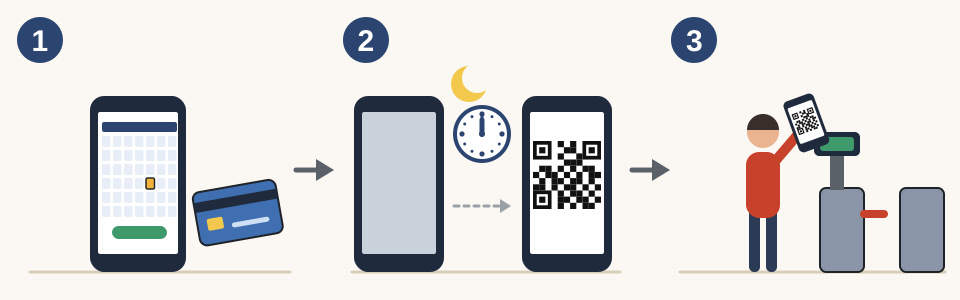
- Log in to your MyDisney Account on the official website or the official app, choose the date of entry, the park and the number of tickets, and buy them.
- From 0:00 on the date of entry, the code for your Park ticket appears in the official app. If you do not use the official app, use the code sent to you by email when you bought the ticket.
- At the park entrance, hold the code over the reader to enter.
- If you enter as a group, the Park tickets of everyone in the group are scanned one after another at the entrance. You cannot scan the Park tickets of people who are not entering with you. If not everyone in your group is there, you may be asked to go back to the end of the line.
- In the official app, the person who bought the tickets can share Park tickets with the people going with them. A person who received a shared Park ticket cannot change its date. Only the person who bought it can change the date.
- The official app cannot be used on some devices, such as tablets and iPads. Install it on your smartphone. For how to get a data connection in the park, see Getting Online in Japan | eSIM vs SIM Card vs Pocket Wi-Fi, What to Check First, and Airport Pickup.
- If you want to leave the park and come back on the same day, tell a staff member as you leave. When you come back, enter through the entrance with your Park ticket.
Booking
Date changes and cancellations
- After you buy a Park ticket, it cannot be canceled or refunded. This also applies on days of bad weather and days when there is an earthquake.
- For Park tickets bought on the official website or the official app that have not yet been used for entry, you can change the date of entry and the age category online. There is no fee. You can change them any number of times, even after the date of entry has passed. You cannot change to a date that is sold out.
- You cannot change the park. A Tokyo Disneyland Park ticket cannot be changed to a Tokyo DisneySea Park ticket. You also cannot change the type of Park ticket.
- When you make a change, you pay the full price of the new Park ticket, and the full price of the original Park ticket is refunded to you. Even when the new Park ticket and the original Park ticket have the same price, you pay the full price and receive a full refund.
- You can make changes until the expiration date. For Park tickets bought on the official website or the official app, the expiration date is the same date 1 year after the date of purchase. It is not 1 year after the date of entry.
- For Park tickets bought from an online travel agency, the expiration date is the same date 1 month after the date of entry. If you want to change the date, contact the travel agency you bought from.
Services
Services you use inside the park
After you enter the park, there are services you can use from the official app.
- Disney Premier Access: A paid service. It lets you ride certain attractions with a short wait, or watch certain parades and shows from a designated area. You pay for it separately from your Park ticket. Numbers are limited and it may sell out.
- Standby Pass: A free service. For some facilities, instead of simply lining up, you first get a Standby Pass and then enter.
Good to know
Other information
- The nearest station to Tokyo Disney Resort is Maihama Station on the JR Keiyo Line. It takes about 15 minutes by train from Tokyo Station.
- If a park closes or its operating hours are shortened because of an earthquake, a power outage or other reasons, there is no compensation.
- For people staying at partner hotels other than Disney Hotels, the conditions for buying Park tickets differ from hotel to hotel. Please check with the hotel where you are staying.
- For tickets to Universal Studios Japan (USJ) in Osaka, see How to Buy USJ Tickets | Studio Pass Types, Universal Express Pass, Area Timed Entry Ticket.